The Nano Banana 2 Free Tier is for:
Casual Creators: Quick posts for Instagram or X with perfect text.
Students: Visualizing ideas for presentations in seconds.
Experimenters: People who just want to play with the latest tech for $0.
The Nano Banana 2 Pro Tier is for:
Small Business Owners: Creating sharp, high-res logos and product mockups.
Freelancers: When you need 4K quality and "Thinking Mode" for client work.
Power Users: Anyone who hates daily limits and needs to iterate until it's perfect.
Nano Banana 2: Nano Is it really the best free AI? (2026 Review)
The Quick Verdict: Nano Banana 2 (Gemini 3 Flash Image) is the speed king. It’s perfect for those who need daily-life AI tools without the technical headache. It’s the strongest free option right now, beating DALL-E in speed, though it still fights with Google's strict "nanny" filters.
Best Free AI Image Generator 2026: Let's be real—the free tier is unbeatable. While Midjourney hides behind a paywall, Nano Banana 2 lets you create high-quality content without touching your wallet.
Legible Text & Logos: Finally! An AI that can actually spell. It’s one of the best tools for AI graphic design, rendering signs and labels with 99% accuracy.
Conversational AI Workflow: You don’t need to be a "Prompt Engineer." Just talk to it. "Make it more blue," "Add a cat," "Now make it vintage." It’s the most natural way to iterate.
The "Plastic" Look: If you are looking for authentic AI photography, Nano Banana sometimes falls short. It has that very clean "Google Stock" finish that lacks the grit of Flux.2 Pro.
Aggressive Safety Filters: It’s a bit of a "goody two-shoes." It might block prompts that aren't even offensive just because they are slightly ambiguous.
Daily Usage Caps: It’s free until it isn’t. Once you hit your daily limit, you’re stuck unless you upgrade to Gemini Ultra, which is quite a jump in price.
What it actually gets right
The Pain Points (The "Meh" Factor)
How I actually get consistent results
Talk, don't command: Don't try to get it right in one go; use its "conversational memory" to tweak the image step-by-step.
Photo Realism: Use "Shot on 35mm" or "Low angle" to kill the "too-perfect" AI look.
Bypass Filters: Avoid edgy words. Use colors instead (e.g., "Crimson" instead of "Bloody").
Logo Hack: Always prompt with "Centered, flat vector, white background" for clean branding.
Is it a robbery?
Nano Banana 2 is the definition of a Freemium model. It’s great to start, but you need to know where the "wall" is so you don't get stuck mid-project.
The Free Tier ($0): This is the sweet spot. You get between 20 and 50 generations per day (Google tweaks this depending on how busy the servers are). For 90% of people doing social media or casual work, this is more than enough. You get the same quality as the paid users, just fewer "bullets" in the gun.
The AI Plus / Pro Plan ($20/month): This is for the "power users." It bumps your limit to 100+ generations per day and gives you priority in the queue. If you use AI for your 9-to-5 job and can't afford to wait 30 seconds for an image, this is your plan.
The Ultra Tier ($125/month): Honestly? It’s a robbery for 99% of you. This is strictly for big companies or agencies that need thousands of 4K images and enterprise-level security. If you're a freelancer or a hobbyist, stay far away from this one.
My Take: Don’t pay a single cent unless you find yourself hitting that "Daily Limit" three days in a row. The free version is so potent that it’s arguably the best value-for-money (literally $0) tool in the AI market right now.
Who is this for?
Visit Nanobanana 2 Official Site


What changes when you pay?
If you're not sure whether to stick with the free version or upgrade, here is the breakdown of what actually changes under the hood.
Daily Limits: * Free: You get enough fuel for daily tasks (around 20-50 images depending on the day). It’s perfect if you only need a couple of good shots.
Pro: You get a massive tank (100+ images daily). This is for those who need to experiment, fail, and try again until the result is 100% perfect.
The "Lens" (Resolution & Detail):
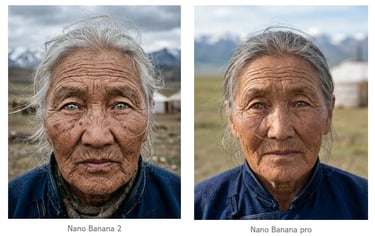
Free: Images are standard quality (1K). They look sharp on your phone or laptop screen, which is usually all you need for social media.
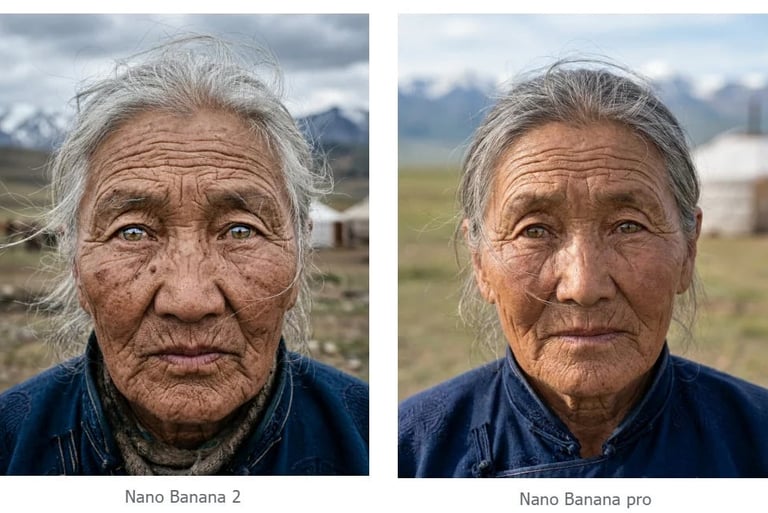
Pro: Unlocks 4K resolution. It’s not just about size; the AI adds "micro-textures" (pores in skin, fabric threads, reflections) that make the image look like professional photography.
The "IQ" (Thinking Mode):
Free: Fast and direct. You ask, it generates. Great for simple prompts.
Pro: Access to Nano Banana Pro. The AI takes a few extra seconds to "reason" through your prompt. If you have complex instructions (like specific text or 5 different people in one scene), the Pro version is much less likely to get confused.
The Quick Summary: > Stay Free if you want fast, high-quality images for your personal projects or social media. Go Pro if you are a professional who needs high-res files for print, complex text, or simply can't afford to run out of "daily credits" in the middle of a job.
DISCOVER MORE AI