
YES for: Graphic designers, marketing agencies, and anyone who needs to be 100% "Copyright Safe." and already use Adobe ecosystem
NO for: Artists looking for a unique style, hobbyists on a budget, or people who want "raw" and edgy photography.
Adobe Firefly: The "Safe" Tool for Real Pros (2026 Review)
The Quick Verdict: Let’s be blunt: Firefly is the "boring" choice, but in a good way. It doesn't have the soul of Midjourney or the raw power of Flux, but it’s the only one that guarantees you won't get sued. If you work for a brand that cares about copyright, this is your only real option.


Commercial Safety: This is its biggest flex. Adobe trained Firefly only on Adobe Stock and public domain images. You can use these results in a global ad campaign without losing sleep over lawsuits.
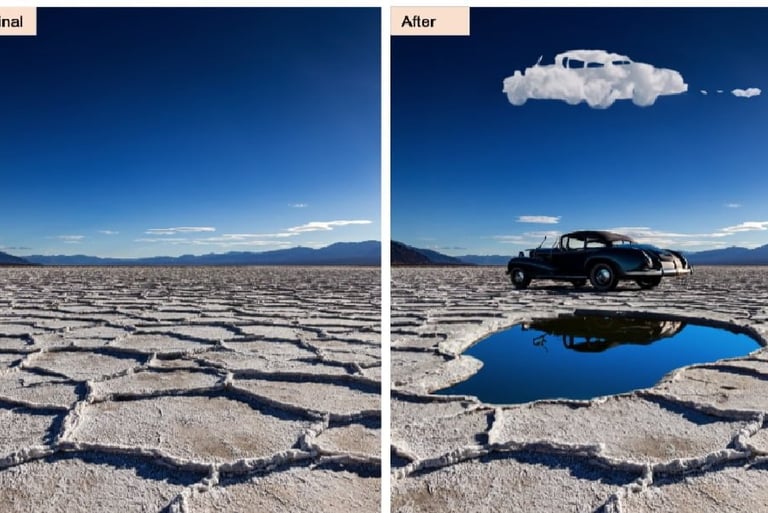
Generative Fill (Photoshop): This is still black magic. Being able to expand a photo, change a shirt, or add a tree inside Photoshop is 100x more useful than generating a random image from scratch.
Vector Generation: It’s the only one that actually talks to Illustrator. You can generate a "vector" and it’s not just a flat image; it’s actual paths you can edit.
That "Adobe Stock" Look: Firefly images often feel a bit... generic. They have that clean, polished, "corporate brochure" vibe. It struggles to create something truly gritty, dark, or deeply artistic.
Strict "Nanny" Filters: It’s extremely censored. Sometimes it refuses to generate things that aren't even offensive, just because it’s playing it way too safe.
Photorealism is "Fine": In 2026, while Flux is making photos that look 100% real, Firefly still has a bit of an "uncanny valley" feel in portraits. It's close, but you can tell it's AI.
What it actually gets right
The Pain Points (The "Meh" Factor)
How I actually get consistent results
Don't use Firefly on its own website. Use it inside the apps. The real "Pro Hack" is using Midjourney for the idea and then bringing that image into Photoshop to use Firefly’s Generative Fill to fix the hands, change the background, or extend the canvas. It’s the perfect "clean-up" tool.
Is it a robbery?
Adobe has changed things up for 2026, and it’s a bit of a credit-counting headache:
The Free Plan: You get 25 credits/month. It’s basically a demo. You’ll use them in 10 minutes.
Firefly Premium ($9.99/mo): You get 100 credits. For a casual user, it’s okay, but it feels expensive for what it is.
The All-Apps Plan ($59.99+/mo): If you already pay for Creative Cloud, you get around 1,000 credits. This is the only way it actually makes financial sense.
My Take: If you don't already use Photoshop or Illustrator, paying for Firefly alone is a waste of money. You’re better off with Midjourney. But if you are a professional designer, it’s an essential part of your toolkit that pays for itself in "legal peace of mind."
Who is this for?
Visit Adobe Firefly Official Site


DISCOVER MORE AI